Docker is popular containerize system that make the application isolated and limit access to the host server, docker have firewall system that not manage to firewall like ufw or firewall-cmd. In case if your docker publish port 8000 and you limit port 8000 with ufw, this is can’t work because docker manage the firewall outside the ufw using iptables.
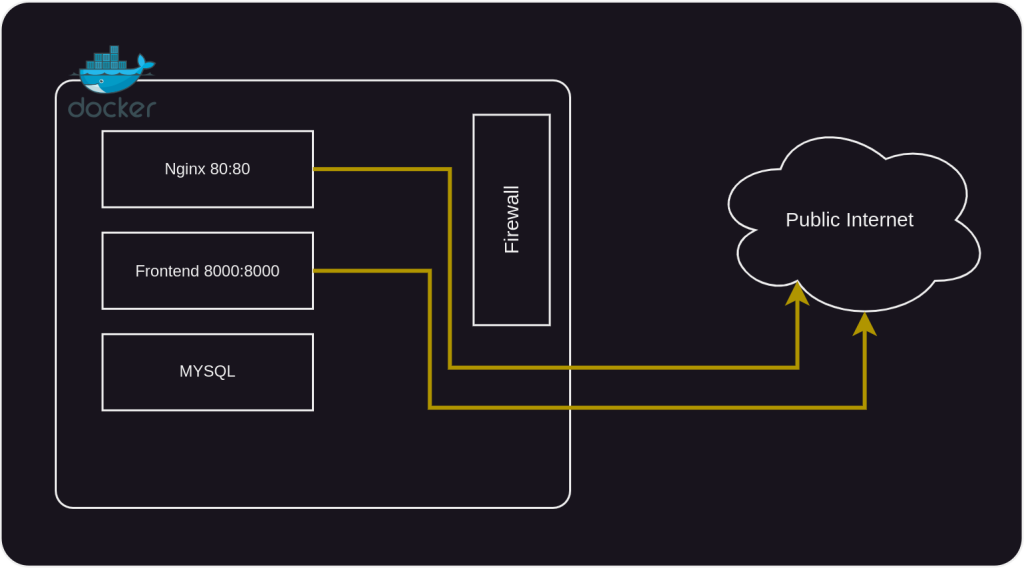
The case can to be issue if you have not external firewall to limit the port access, the public can see the open port of your server. The solution, you can disabled iproute of docker but you must be config the routing with manual. But i thinks this is solution for secure your server and application.
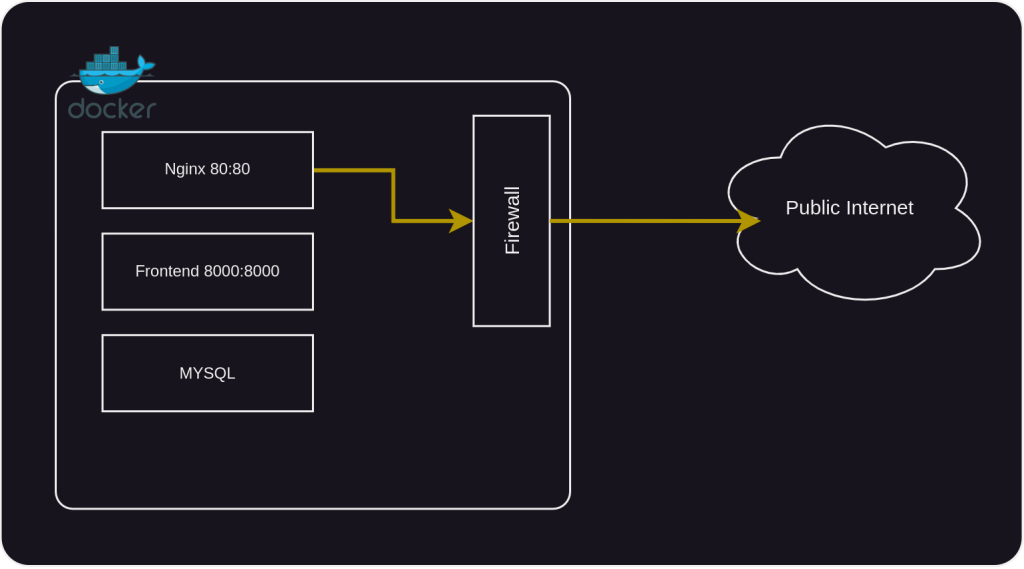
Okay, lets setup the server.
Disabled iptables docker
Add the code below to /etc/docker/daemon.json
{"iptables":false}After adding the script, restart the docker services
sudo systemctl restart dockerIn case after you disabled iptables from docker daemon you can’t have access to internet from container. You must add nat from iptables to your docker network.
Give Internet Access to Docker Network
sudo docker network inspect app-net | grep -oP '"Subnet": "\K[0-9.\/]+'Note : Change the app-net to your docker network name
sudo iptables -t nat -A POSTROUTING -s 172.18.0.0/16 ! -o docker0 -j MASQUERADENote : Change the 172.18.0.0/16 to your result after run docker network command
Try to running ping on your container to make sure the container have access to internet, Example :
sudo docker exec -it nginx ping google.comSave iptables configuration
Your iptables configuration only can running temporary, if you want to keep it you must to install iptables-persistent and save the config, so if your computer reboot you didn’t need to config again.
sudo apt install -y iptables-persistent
sudo iptables-save > /etc/iptables/rules.v4
sudo iptables-save > /etc/iptables/rules.v6Conclusion
The docker have different firewall rules than the firewall system in sever, that make the public port on your docker can see in port sanning. You can hiden your public port with disable iptables from the docker and make iptable manual to give the container internet access, after that you must be limit the port using firewall like ufw in ubuntu.
Reference
- https://askubuntu.com/questions/1001101/disabled-ports-with-ufw-but-outside-scan-still-shows-them-as-open
- ChatGPT